


What is Prompt Adherence?
On this page
Prompt Adherence is a Premium Feature thatcontrols how closely the Generator follows your Prompt and selected Tags.
Lower settings give the Generator more freedom to interpret your inputs. Higher settings place more emphasis on following the details you provide.
Important Note: Prompt Adherence cannot make a Style generate Characters, scenes, or actions that it does not support.
Although the Generators were trained on extensive datasets, that doesn’t mean that it can recognise every keyword. If you’re unsure as to whether a prompt will be recognised or not, head to our homepage and use the Search function to look for specific keywords. If no satisfactory or relevant results appear, then it’s likely that this element isn’t recognised in the dataset.
How to Find Prompt Adherence
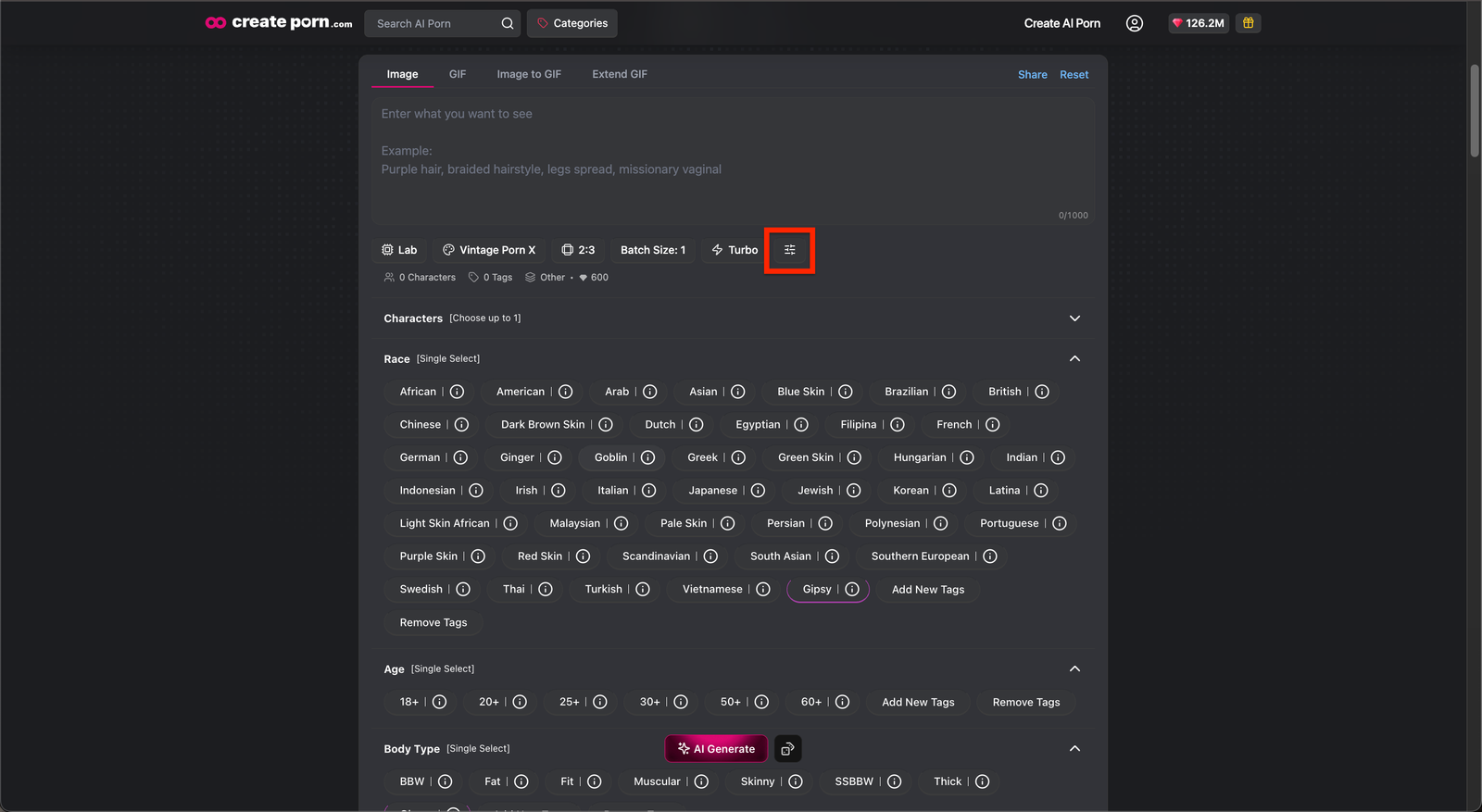
Open the Create page and select the Style you want to use.
Enter your instructions in the Prompt Box.
Select the icon next to Turbo to open the Negative Prompt and Adherence to Prompt settings.
Select an Adherence Option
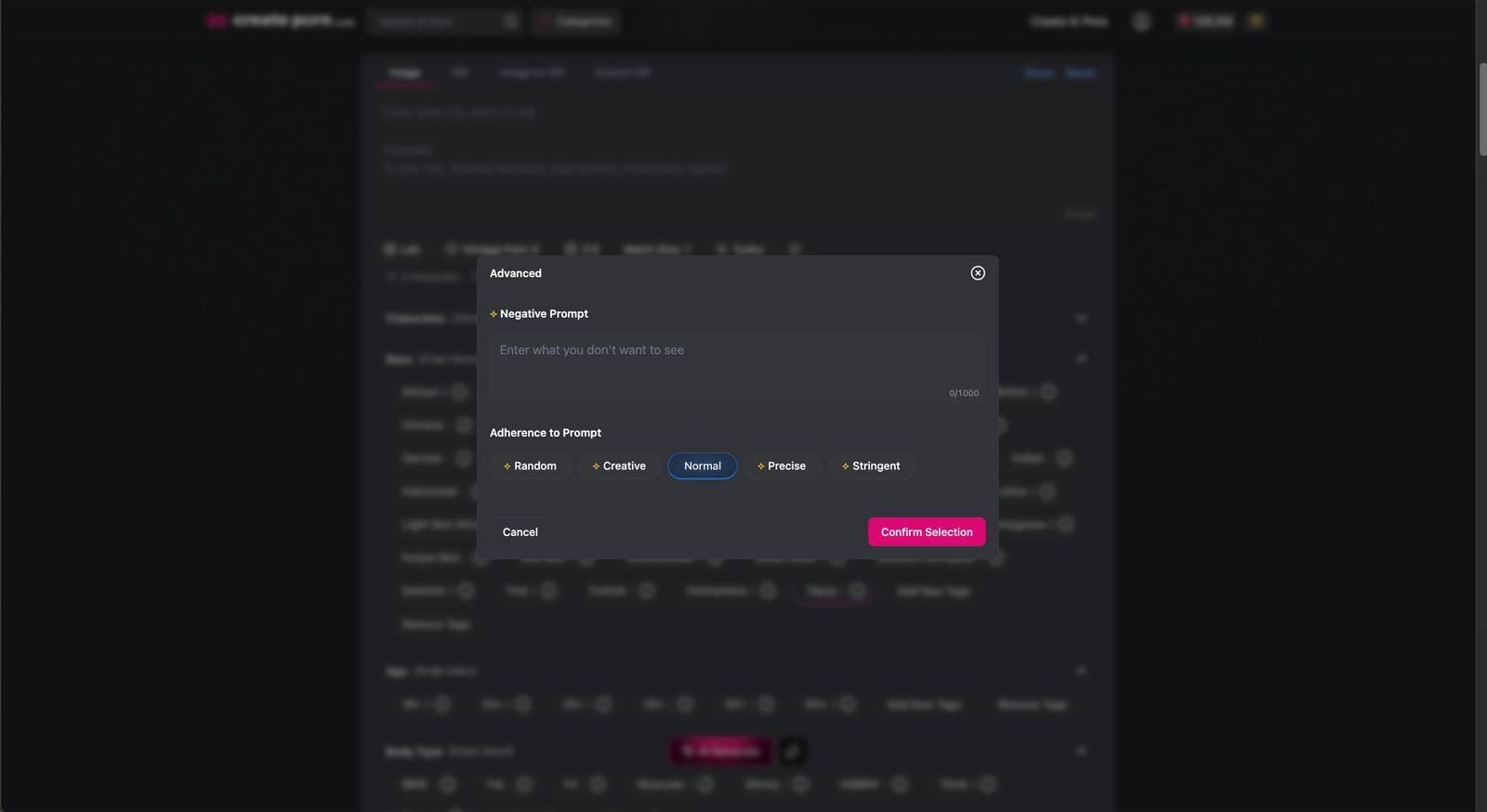
Choose an option before generating:
- Random: Gives the Generator the most freedom to vary the result.
- Creative: Follows the general idea while allowing creative interpretation.
- Normal: Balances Prompt accuracy and creative freedom.
- Precise: Place more emphasis on following your specific instructions.
- Stringent: Applies the strongest adherence to your Prompt and Tags.
Start with Normal, then try other options to compare the results.
What to Do When the Image Does Not Match Your Inputs
Improve Your Prompt
Make your instructions clearer by:
- Shortening your prompts
- Placing the most important details first
- Using direct and recognizable keywords
- Removing repeated or conflicting instructions
- Adjusting Prompt Strength
- Simplifying highly specific combinations
Review Your Tags
Check whether your selected Tags conflict with the Prompt or with one another.
Remove unnecessary Tags and generate the Image again.
Try Another Adherence Option
Generate the same Prompt using a different adherence option.
Change one setting at a time so you can identify which option produces the best result.
Try a Different Style
Some Styles support certain Characters, scenes, and actions better than others.
X Styles are generally more flexible than standard Styles. XL Styles are more advanced than X Styles and may provide better results for more detailed requests.
However, highly specific or unusual combinations may still not be supported.
Learn more in our X and XL Styles guide.
Prompt Adherence Limitations
Increasing Prompt Adherence does not expand the Generator’s capabilities.
The requested result may not appear when:
- The selected Style does not support the Character, scene, or action
- The Generator does not recognize a keyword
- The Prompt contains conflicting instructions
- Too many specific details are combined
- The requested composition is too complex
Simplifying the Prompt or trying another Style may improve the result.
Need Help?
If the result still does not match your inputs, contact Support and include:
- The Prompt and Tags used
- The selected Style
- The Prompt Adherence option
- The Creation link
- A short description of the expected result